Custom Collections
Note: Custom Collections are only available when using the Hierarchy & Operations
When a node group is added to the Peek Hierarchy:
You gain the ability to create Custom Node Collections for those specific node groups.
These nodes are exposed in the custom collections panel of Peek, and can be organized exactly as needed, and managed in any available editor (e.g., the Shader Editor, the Node Editor, or the Compositor). Moreover, the Peek sidebar is available in the 3d Viewport and retains full functionality that the Peek sidebar has in the Node Editors.
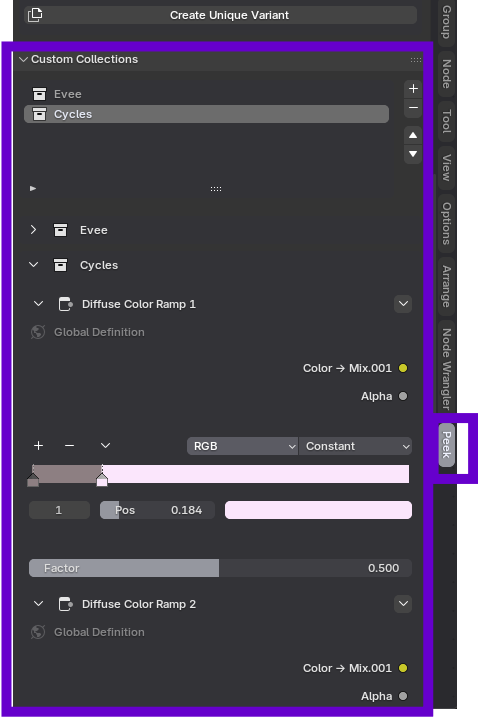
Creating a Custom Collection
Inside the node group you are visualizing in the Peek Hierarchy:
- Right-click on a node you want to expose.
- Select:
Context Menu -> Peek Options -> New Collection. - Enter a collection name (Default is "My Controls").
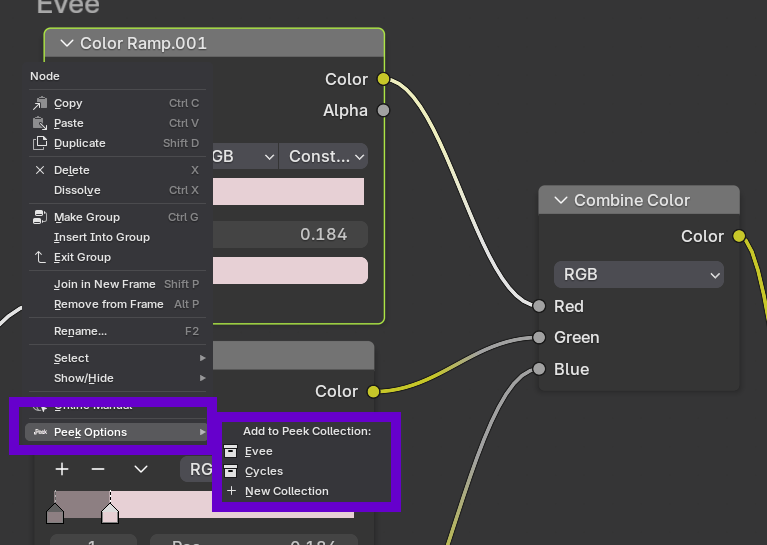
The node will appear in the Custom Collections sub-panel of the sidebar.
This allows you to build a clean, custom interface that can be controlled from the sidebar. Useful for simple and complex node groups, as collections allow to explicitly decide which nodes can be controlled from the Peek Custom Collections Sub-panel.