Global Collections
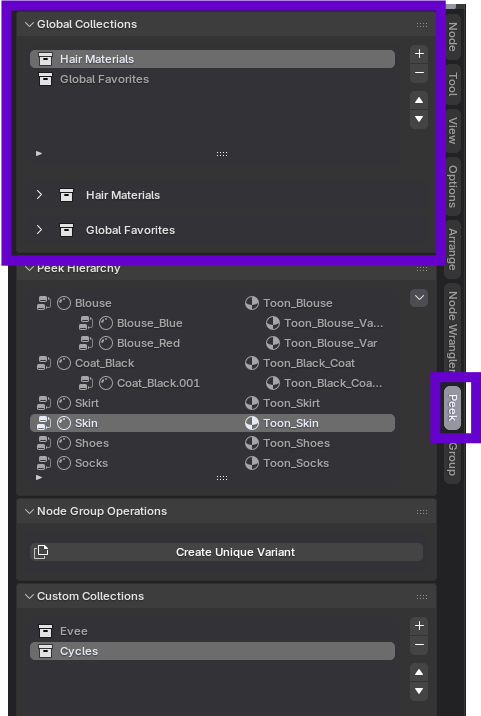
Global Collections are the easiest way of using Peek. These are node collections that can be seen globally from the Peek sidebar panel.
Adding a Node to Global Collections
Right-click on any node in the shader editor that you want to add to the sidebar and select:
Context Menu -> Peek Options -> New Global Collection
(If collections already exist, you will see them listed or can create a new one)
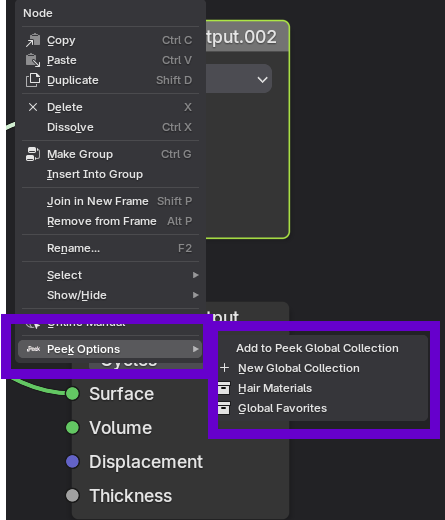
Enter the name of the collection when prompted, and the node will appear in the Global Collections sub-panel.
Managing Collections
You can add, delete, and reorder the node collections using the up/down arrows next to the Global Collections List.
WARNING: Nodes in a global collection are bound to the specific material to which they belong.
If you later add the parent node group to the Peek Hierarchy (Advanced Mode), nodes in Global Collections from that group will be pruned to prioritize the hierarchy view.